






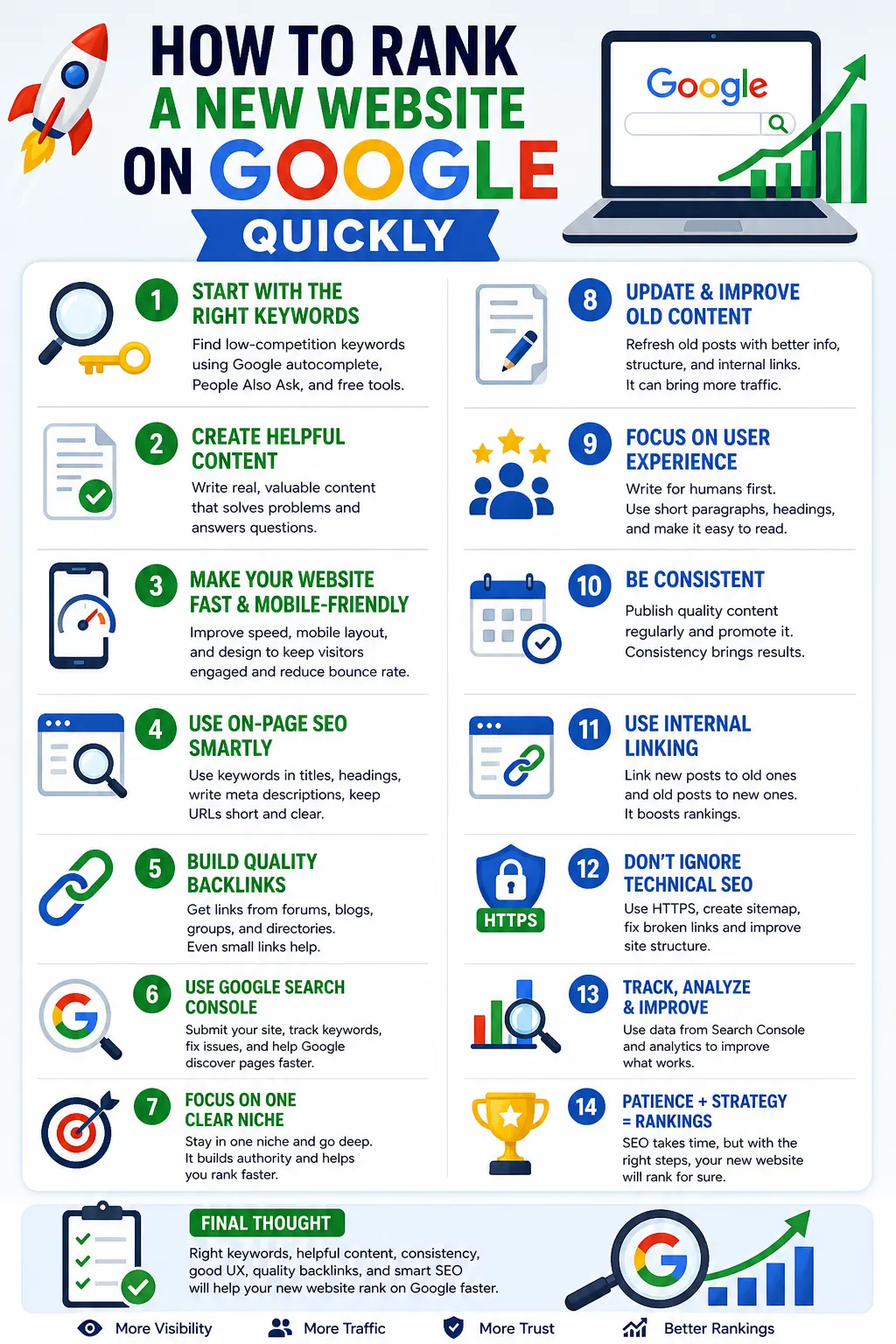
A new website ranks on Google fastest by following 8 steps in order: get indexed, target low-competition long-tail keywords, write content that fully answers one question, optimise each page, build topical clusters, add internal links, earn a few relevant backlinks and meet Google’s page experience standards. New sites start with no authority, so the order matters. This guide explains each step and the data behind it.
Why Is It Hard for a New Website to Rank?
New websites struggle to rank because they have no backlinks, no ranking history and little topical authority. The competition is already established. A 2017 Ahrefs study of 2 million pages found that only 5.7% of newly published pages reached Google’s top 10 within a year, and the average top-10 page was more than 2 years old. A later Ahrefs analysis in 2020 found that 90.63% of pages get no organic traffic from Google at all.
These numbers do not mean new sites cannot rank. They show that random publishing rarely works, and a structured approach is needed.
Step 1: How Do You Get a New Website Indexed?
To get a new website indexed, make sure search engines are allowed to crawl it, submit a sitemap and request indexing in Google Search Console. Google states that crawling and indexing a new site can take from several days to several weeks.
- Turn off “Discourage search engines from indexing this site” in WordPress under Settings → Reading.
- Generate an XML sitemap with an SEO plugin such as Rank Math or Yoast, usually at
/sitemap_index.xml. - Verify the site in Google Search Console and submit the sitemap.
- Use the URL Inspection tool to request indexing for your 10 to 20 most important pages.
The Pages report in Search Console lists every excluded URL with a reason, such as “Not found (404)” or “Crawled – currently not indexed”.
Step 2: Which Keywords Should a New Website Target?
A new website should target long-tail keywords: longer, specific phrases with low competition and clear intent. Most searches fall into this group. Ahrefs found that 92.42% of keywords receive 10 or fewer searches per month. Broad terms such as “best laptops” are dominated by large, established sites, while specific questions such as “best laptop for video editing under $1,000” are far easier to win.
4 free sources reveal long-tail keywords:
- Google autocomplete suggestions.
- The “People also ask” box.
- Related searches at the bottom of the results page.
- Questions on Reddit, Quora and niche forums.
Search each keyword yourself. Results full of forums, small blogs or outdated pages signal a realistic opportunity. Our list of the best SEO tools for ranking websites covers keyword research tools.
Step 3: What Kind of Content Ranks for a New Site?
Content that answers one specific question completely, better than the current top results, ranks best for a new site. Google’s guidance on helpful content asks whether a page provides original information, a complete description of the topic and insight beyond the obvious.
- Answer the main question in the first 2 sentences.
- Add something the top results lack: a real example, a screenshot, original data or a clearer step.
- Show the author’s name, experience and a short bio.
- Cover every sub-question a reader has, then stop. Length should match the topic, not a word-count target.
Step 4: How Do You Optimise Each Page?
To optimise each page, place the main keyword in the title, URL, first paragraph and at least one heading, and write a clear meta description. 5 on-page basics:
- Use one H1 and descriptive H2 and H3 headings.
- Keep URLs short, readable and permanent.
- Write a meta description of about 150 characters that states what the reader will get.
- Add descriptive alt text to every image and compress files before upload.
- Avoid keyword stuffing. Rewrite any sentence that sounds unnatural when read aloud.
Step 5: What Are Topic Clusters?
Topic clusters are groups of articles that cover one subject in depth, with a main guide linked to several supporting articles. Google builds an understanding of what a website is about from the topics it covers consistently. A new site that publishes 10 connected articles on one subject sends a stronger signal than 50 unrelated articles across many niches.
Plan 1 pillar guide and 5 to 10 supporting articles per topic, each answering a narrower question and linking back to the pillar.
Step 6: How Should You Use Internal Links?
Internal links help Google discover new pages and understand which pages matter most. They are the only links fully under your control.
- Link every new article from 2 or 3 related existing articles.
- Use anchor text that matches the target page’s topic, such as “emergency fund guide” instead of “click here”.
- Check that “Read more” buttons and related-post widgets point to the correct posts.
- Fix broken internal links, which waste crawl time.
Step 7: How Many Backlinks Does a New Website Need?
A new website needs a small number of relevant, high-quality backlinks rather than a large volume. Backlinks remain a strong ranking signal. A 2020 Backlinko analysis of 11.8 million Google results found that the first-ranked result had 3.8 times more backlinks than results in positions 2 to 10.
4 safe ways to earn first backlinks:
- Write guest posts for real, relevant blogs with their own organic traffic.
- Answer journalist and blogger requests for expert quotes.
- Publish original data, checklists or templates that others want to cite.
- List the business on genuine industry and local directories.
Avoid bulk link packages and private blog networks. Google’s spam policies treat link schemes as spam. Our guide on how to get high-quality backlinks for free explains each method.
Step 8: What Technical Standards Does Google Expect?
Google expects a secure, mobile-friendly site that loads quickly and stays visually stable. Google completed its move to mobile-first indexing for all websites in 2023, so the mobile version of each page is the one Google evaluates. Core Web Vitals set 3 measurable targets:
| Metric | What it measures | Good score |
|---|---|---|
| Largest Contentful Paint (LCP) | Loading speed of the main content | 2.5 seconds or less |
| Interaction to Next Paint (INP) | Response time to clicks and taps | 200 milliseconds or less |
| Cumulative Layout Shift (CLS) | Visual stability while loading | 0.1 or less |
Use HTTPS on every page, compress images, use a caching plugin and remove unused plugins. Google PageSpeed Insights shows each page’s scores.
How Long Does It Take a New Website to Rank?
Low-competition pages on a new website often start appearing within weeks of being indexed, while competitive keywords usually take 6 to 12 months or longer. Track progress in Search Console in 3 stages: pages indexed, then impressions, then clicks. Growing impressions show the strategy is working before clicks arrive.
Frequently Asked Questions
Can a new website rank without backlinks?
Yes, for low-competition long-tail keywords. Backlinks become more important as keyword competition increases.
How many articles should a new website publish?
Start with 10 to 20 strong, interlinked articles on one topic before expanding into new subjects.
Why is my new website not showing on Google?
Check the Pages report in Google Search Console. It lists every excluded URL and the reason, such as a noindex tag, a 404 error or “Crawled – currently not indexed”.
Does posting every day help a new site rank?
Consistency helps, but quality matters more than frequency. Two complete, useful articles per week outperform daily thin posts.
Sources
- Ahrefs. How Long Does It Take to Rank in Google?, 2017; and 90.63% of Content Gets No Traffic From Google, 2020.
- Ahrefs. Long-tail keyword research study.
- Backlinko. Search Engine Ranking Factors analysis of 11.8 million Google search results, 2020.
- Google Search Central. SEO Starter Guide, Creating helpful, reliable, people-first content, Spam policies, Core Web Vitals and mobile-first indexing documentation.